What is Vocal Separator?
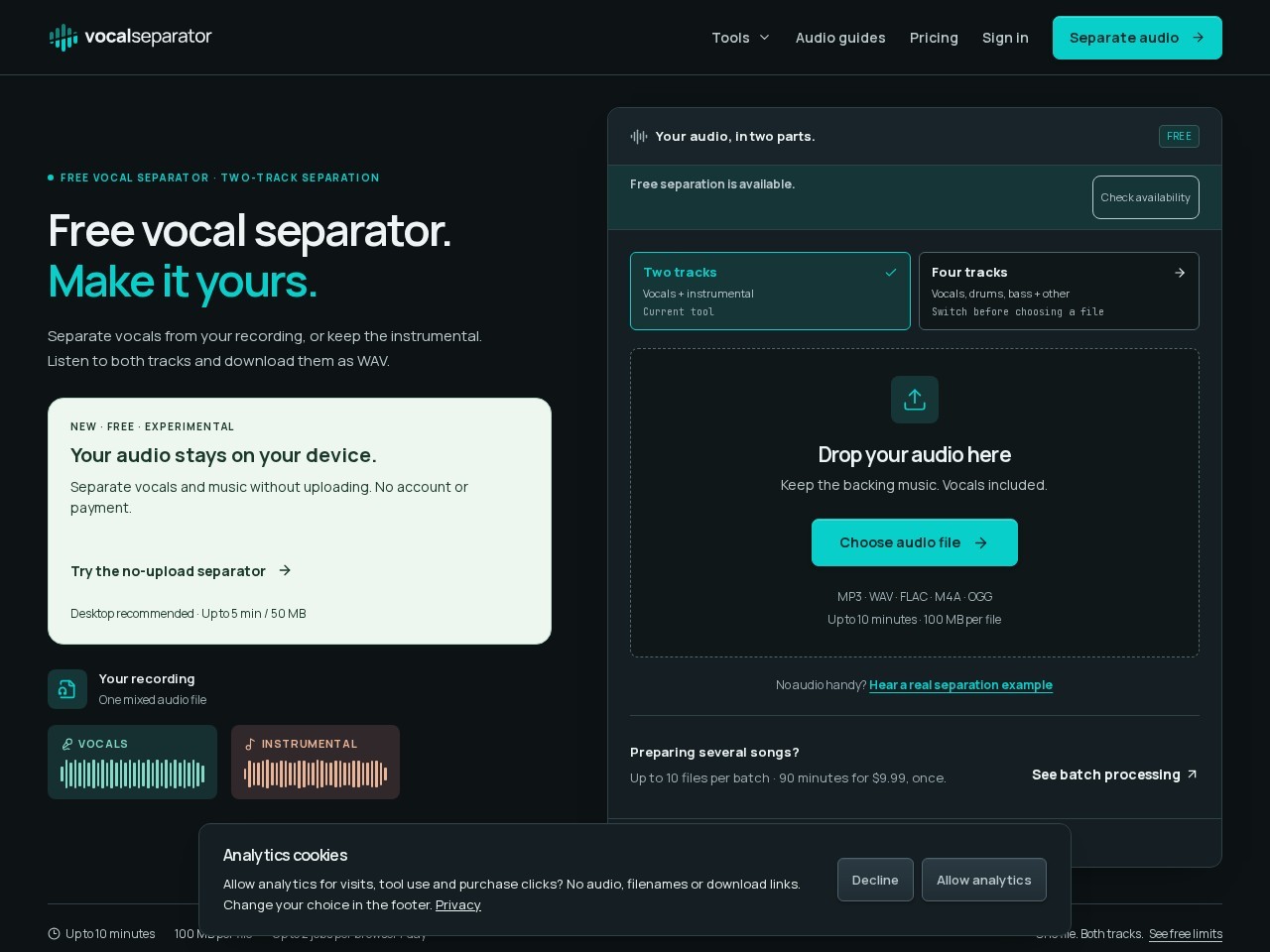
Hosted at vocalseparator.com, Vocal Separator accepts one mono or stereo MP3, WAV, FLAC, M4A or OGG file and returns separated audio as downloadable WAV files on the same page.

Vocal Separator splits a recording you own into vocals and instrumental WAV tracks in the browser, and also returns four stems. Singers, karaoke hosts and remixers get two free Vocal Separator cloud jobs per browser each UTC day without an account, plus a one-time $9.99 Minute Pack covering 90 processing minutes valid for 12 months.
Verified facts from the vendor site · Last verified Nov 14, 2026. Independent Vocal Separator review covering pricing, features, who it is for, and alternatives.
Hosted at vocalseparator.com, Vocal Separator accepts one mono or stereo MP3, WAV, FLAC, M4A or OGG file and returns separated audio as downloadable WAV files on the same page.
Vocal Separator is freemium. It starts at $0/month. Paid plans include Free: monthly $0/mo: yearly $0/yr ($0/mo effective); Minute Pack: monthly $9.99/mo: $9.99. Check vocalseparator.com for current prices.
Vocal Separator has a free tier. Paid plans start at $9.99/month.
Vocal Separator is best for teams removing vocals from a licensed recording to create a karaoke instrumental WAV and building a rehearsal backing track for singing practice.
Vocal Separator is best for teams removing vocals from a licensed recording to create a karaoke instrumental WAV and building a rehearsal backing track for singing practice. Skip it if vocal Separator free download links expire 55 minutes after processing finishes, and reopening the page does not extend that window.
The main Vocal Separator features are Two-track separation into a vocals WAV and an instrumental WAV from one job, Four-track stem splitter for vocals, drums, bass and other instruments, Accepts mono or stereo MP3, WAV, FLAC, M4A and OGG files, Local file preview in the browser before any upload starts, and Same-page player that switches between original, vocals and instrumental at the same playback position.
The closest Vocal Separator alternatives on Citeware are Fish Audio, Wave.video, VEED, Vidnoz AI, HeyGen. Full list: https://citeware.io/alternatives/vocal-separator.
Limitations called out on this listing: Vocal Separator free download links expire 55 minutes after processing finishes, and reopening the page does not extend that window; Vocal Separator limits free use to 2 cloud jobs per browser per UTC day, shared between the two-track and four-track tools; Vocal Separator caps free uploads at 10 minutes and 100 MB per file, with one file per upload; Vocal Separator rejects YouTube, Spotify and other streaming links and accepts local files only; Vocal Separator rounds every paid file up to the next whole minute, so a 3 minute 20 second song spends four minutes of the pack.
Vocal Separator is available on Web.
vs Vocal Separator vs Fish AudioExpressive real-time AI text-to-speech, voice cloning, and speech-to-text built on the S2.1 Pro modelvs
 Vocal Separator vs Wave.videoOnline video editor, live multistreaming studio, recorder, and hosting in one browser platformvs
 Vocal Separator vs VEEDGenerate, edit, subtitle and dub videos in one browser workflowvs
 Vocal Separator vs Vidnoz AIFree AI video generator with 1900+ avatars, 2000+ voices, and 2800+ templatesvs
 Vocal Separator vs HeyGenAI avatar video creation, voice cloning, and lip-synced translation in 175+ languagesvs
 Vocal Separator vs PixVerseProprietary AI video models for clip generation, cinematic production, and real-time interactive worlds
Public threads about Vocal Separator
Community observations
No recent Hacker News threads
Nothing matched Vocal Separator on Hacker News right now. Search X, Reddit, or another network above.
Citeware analysis
Hosted at vocalseparator.com, Vocal Separator accepts one mono or stereo MP3, WAV, FLAC, M4A or OGG file and returns separated audio as downloadable WAV files on the same page. The two-track path in Vocal Separator produces a vocals track and an instrumental track from a single job, while the stem splitter path in Vocal Separator produces four WAV stems covering vocals, drums, bass and other instruments. The Vocal Separator contact page describes the service as audio-processing software rather than a music catalogue, and the Vocal Separator terms repeat that separating a recording grants no copyright, publishing, performance or distribution rights.
The people most likely to open Vocal Separator are singers assembling a rehearsal backing track, vocal coaches studying phrasing in isolation, karaoke organisers who need the instrumental from a recording they are licensed to use, and producers pulling an acapella into a digital audio workstation. Because Vocal Separator asks for no account, no email address and no card on the free path, Vocal Separator also suits occasional jobs where committing to a monthly stem-separation subscription would be excessive.
The working sequence inside Vocal Separator is short. A user picks a local file, which Vocal Separator previews on the device without uploading anything, confirms rights to the audio, then starts separation so the file is uploaded to private temporary storage for cloud processing. Results land on the same Vocal Separator page, where the player switches between the original, the vocals and the instrumental at the same playback position so residue, instrument bleed and softened note endings can be checked before each WAV is downloaded. Vocal Separator publishes a 55-minute free download window, and reopening the page does not extend that window.
Alongside cloud separation, Vocal Separator ships browser-side utilities that consume no separation jobs: a BPM finder, a BPM counter, tap tempo, a metronome, a bass boost that exports 44.1 kHz 16-bit WAV, and an Audio Practice view with looping, named passages, speed and pitch adjustment plus MP3 or WAV export. Vocal Separator also offers an experimental no-upload separator at /local-separator that downloads a UVR MDX-Net model from a byte-verified, fixed-revision Hugging Face mirror and processes audio entirely in the tab, which the Vocal Separator privacy policy says never falls back to cloud upload.
Packaging at Vocal Separator is deliberately simple and avoids recurring billing. The Vocal Separator free plan costs $0 with no account or card, allows one file per upload, caps each file at 10 minutes and 100 MB, and grants up to 2 processing jobs per browser per UTC day shared between the two-track and four-track tools. The only paid option in Vocal Separator is the Minute Pack at $9.99 USD once, tax included, for 90 processing minutes that expire 12 months after the verified payment time with no automatic renewal. Vocal Separator states that free and paid processing use the same separation models and WAV quality, so the pack buys batch handling, files up to 60 minutes and 250 MB, up to 10 files and 60 billed minutes per batch, and private delivery inside a verified account.
The constraints around Vocal Separator are published openly and should be read before buying. Vocal Separator rejects YouTube, Spotify and other streaming links and accepts local files only. Free Vocal Separator results disappear from the download link after 55 minutes, and the service is described as temporary delivery rather than permanent storage. Paid Vocal Separator minutes round each file up to the next whole minute, so a three-minute twenty-second song consumes four minutes, and site capacity or network safeguards can pause Vocal Separator processing even when daily jobs remain.
Compared with subscription separation services that meter monthly stem credits and store a library in the cloud, Vocal Separator trades long-term storage and account features for anonymous, immediate use and a single low-cost credit pack. Buyers who need video input, lyric overlays or a karaoke video will find Vocal Separator out of scope, since Vocal Separator outputs audio only. Buyers who separate a handful of tracks a month, want WAV rather than lossy exports, and dislike recurring charges will find the Vocal Separator free allowance plus the one-time Minute Pack a close match to that pattern.
Suitable for
Teams removing vocals from a licensed recording to create a karaoke instrumental WAV and building a rehearsal backing track for singing practice
Evidence: Homepage (Primary) · Pricing (Primary) · Verified Nov 14, 2026.
Citeware analysis
Evidence: Homepage (Primary) · Verified Nov 14, 2026.
Verified facts
Evidence: Homepage (Primary) · Verified Nov 14, 2026.
Verified facts
Free
$0/mo
Minute Pack
$9.99/mo
Evidence: Homepage (Primary) · Pricing (Primary) · Verified Nov 14, 2026.
Verified facts
Online AI audio separation at vocalseparator.com: two-track (vocals + instrumental) and four-track (vocals, drums, bass, other) WAV outputs. Free cloud separation of one mono or stereo file at a time, up to 10 minutes and 100 MB, with a daily allowance that resets at midnight UTC and is tracked by an essential browser cookie (no account). Does not grant copyright, publishing, performance or distribution rights over separated output; user must obtain any needed permissions. Vocal Separator also lists other losses and interruptions it does not cover.
Vocal Separator says it collects account and identity, contact details, payment information, product usage and analytics, and device and ip data. That data is used for verified account and sign-in link to access purchased minutes and paid batches. The policy says Vocal Separator is not collecting advertising and remarketing.
A separate refund policy page covers eligibility, processing failures and incorrect charges. Terms state an entirely unused Minute Pack can be submitted for full refund review within seven days of purchase; other cases need support review. There is no subscription to cancel, and mandatory consumer rights are not limited.
Online AI audio separation at vocalseparator.com: two-track (vocals + instrumental) and four-track (vocals, drums, bass, other) WAV outputs. Free cloud separation of one mono or stereo file at a time, up to 10 minutes and 100 MB, with a daily allowance that resets at midnight UTC and is tracked by an essential browser cookie (no account). Does not grant copyright, publishing, performance or distribution rights over separated output; user must obtain any needed permissions. Vocal Separator also lists other losses and interruptions it does not cover.
Vocal Separator says it collects account and identity, contact details, payment information, product usage and analytics, and device and ip data. That data is used for verified account and sign-in link to access purchased minutes and paid batches. The policy says Vocal Separator is not collecting advertising and remarketing.
Account and identity
Collectingverified account and sign-in link to access purchased minutes and paid batches
Contact details
Collectingemail address provided at checkout to assign minutes and send sign-in link; support email
Payment information
Collectingpurchase records retained for access, accounting and dispute handling; checkout handled by Waffo Pancake or Creem as merchant of record
Product usage and analytics
Collectingfixed action counts and first-party tool-use counters; optional Google Analytics events on visit sources and tool use
Device and IP data
Collectingbrowser and device information in analytics; IP address received by model mirror host and hosting access logs
User content and uploads
Collectinguploaded audio copied to private temporary storage for cloud processing, then automatically deleted; local tools process audio on device without upload
Cookies and tracking
Collectingessential daily-allowance and job recovery cookies, HttpOnly guest receipt cookie, and optional analytics cookies after consent
Location
UnclearVocal Separator does not clearly say whether it collects location.
Shared with third parties
Collectingprocessing providers, hosting provider, Hugging Face model mirror, payment providers (Waffo Pancake, Creem), Google Analytics and Microsoft Clarity after consent
Advertising and remarketing
Not collectingGoogle signals, advertising storage and advertising personalization are disabled
Used to train AI models
UnclearVocal Separator does not clearly say whether it collects used to train ai models.
How long data is kept
CollectingVocal Separator collects how long data is kept.
Offers a refund: Yes
A separate refund policy page covers eligibility, processing failures and incorrect charges. Terms state an entirely unused Minute Pack can be submitted for full refund review within seven days of purchase; other cases need support review. There is no subscription to cancel, and mandatory consumer rights are not limited.
Evidence: Terms (Primary) · Privacy (Primary) · Verified Nov 14, 2026.
Citeware analysis
Named models, written separately. These are labeled Citeware analysis, not vendor claims.
anthropic · claude-opus-5 · Nov 14, 2026
A genuinely free, account-free vocal splitter that documents its own limits more honestly than most paid competitors — but the cloud path runs Spleeter, and the sharper model is parked behind an experimental local page.
November 2026: the free tier is real and the disclosure is exemplary. Just know cloud jobs use Spleeter, so dense mixes will show seams.
The free path holds up. No account, no card, both WAVs from a single job, and local preview costs nothing from your allowance.
The on-device extras — BPM, tap tempo, metronome, bass boost, looped practice — never touch cloud quota, which makes this more useful as a rehearsal bench than as a one-shot separator.
Strengths
Watch-outs
Verified facts
Common questions about Vocal Separator.
Hosted at vocalseparator.com, Vocal Separator accepts one mono or stereo MP3, WAV, FLAC, M4A or OGG file and returns separated audio as downloadable WAV files on the same page. Source: https://vocalseparator.com/
Vocal Separator is freemium. It starts at $0/month. Paid plans include Free: monthly $0/mo: yearly $0/yr ($0/mo effective); Minute Pack: monthly $9.99/mo: $9.99. Check vocalseparator.com for current prices. Source: https://vocalseparator.com/pricing
Vocal Separator has a free tier. Paid plans start at $9.99/month. Source: https://vocalseparator.com/pricing
Vocal Separator is best for teams removing vocals from a licensed recording to create a karaoke instrumental WAV and building a rehearsal backing track for singing practice. Source: https://vocalseparator.com/
Vocal Separator is best for teams removing vocals from a licensed recording to create a karaoke instrumental WAV and building a rehearsal backing track for singing practice. Skip it if vocal Separator free download links expire 55 minutes after processing finishes, and reopening the page does not extend that window. Source: https://vocalseparator.com/
The main Vocal Separator features are Two-track separation into a vocals WAV and an instrumental WAV from one job, Four-track stem splitter for vocals, drums, bass and other instruments, Accepts mono or stereo MP3, WAV, FLAC, M4A and OGG files, Local file preview in the browser before any upload starts, and Same-page player that switches between original, vocals and instrumental at the same playback position. Source: https://vocalseparator.com/
The closest Vocal Separator alternatives on Citeware are Fish Audio, Wave.video, VEED, Vidnoz AI, HeyGen. Full list: https://citeware.io/alternatives/vocal-separator. Source: https://vocalseparator.com/
Limitations called out on this listing: Vocal Separator free download links expire 55 minutes after processing finishes, and reopening the page does not extend that window; Vocal Separator limits free use to 2 cloud jobs per browser per UTC day, shared between the two-track and four-track tools; Vocal Separator caps free uploads at 10 minutes and 100 MB per file, with one file per upload; Vocal Separator rejects YouTube, Spotify and other streaming links and accepts local files only; Vocal Separator rounds every paid file up to the next whole minute, so a 3 minute 20 second song spends four minutes of the pack. Source: https://vocalseparator.com/
Vocal Separator is available on Web. Source: https://vocalseparator.com/
Common Vocal Separator use cases include Removing vocals from a licensed recording to create a karaoke instrumental WAV, Building a rehearsal backing track for singing practice, Extracting an acapella to study a singer's phrasing and diction, Pulling vocal and instrumental WAVs into a digital audio workstation for a remix, Isolating bass or drum stems to study a groove or bass line, Preparing looped practice passages at adjusted speed and pitch for a lesson, Finding the tempo of a track with the BPM counter or tap tempo before rehearsal, Batch-separating a set of longer songs after buying the Minute Pack. Source: https://vocalseparator.com/
Vocal Separator collects account and identity. verified account and sign-in link to access purchased minutes and paid batches. Vocal Separator collects contact details. email address provided at checkout to assign minutes and send sign-in link; support email. Vocal Separator collects payment information. purchase records retained for access, accounting and dispute handling; checkout handled by Waffo Pancake or Creem as merchant of record. Vocal Separator collects product usage and analytics. fixed action counts and first-party tool-use counters; optional Google Analytics events on visit sources and tool use. Vocal Separator collects device and ip data. browser and device information in analytics; IP address received by model mirror host and hosting access logs. Vocal Separator collects user content and uploads. uploaded audio copied to private temporary storage for cloud processing, then automatically deleted; local tools process audio on device without upload. Vocal Separator collects cookies and tracking. essential daily-allowance and job recovery cookies, HttpOnly guest receipt cookie, and optional analytics cookies after consent. Vocal Separator collects shared with third parties. processing providers, hosting provider, Hugging Face model mirror, payment providers (Waffo Pancake, Creem), Google Analytics and Microsoft Clarity after consent. Vocal Separator says it does not collect advertising and remarketing. Google signals, advertising storage and advertising personalization are disabled. Vocal Separator collects how long data is kept. Source: https://vocalseparator.com/privacy
Confirm pricing, limits, and support on the official site before you buy. Source: https://vocalseparator.com/
Evidence: Homepage (Primary) · Verified Nov 14, 2026.
Looking for more options? Browse all Vocal Separator alternatives.
Public threads about Vocal Separator
Community observations
No recent Hacker News threads
Nothing matched Vocal Separator on Hacker News right now. Search X, Reddit, or another network above.