What is Fotor?
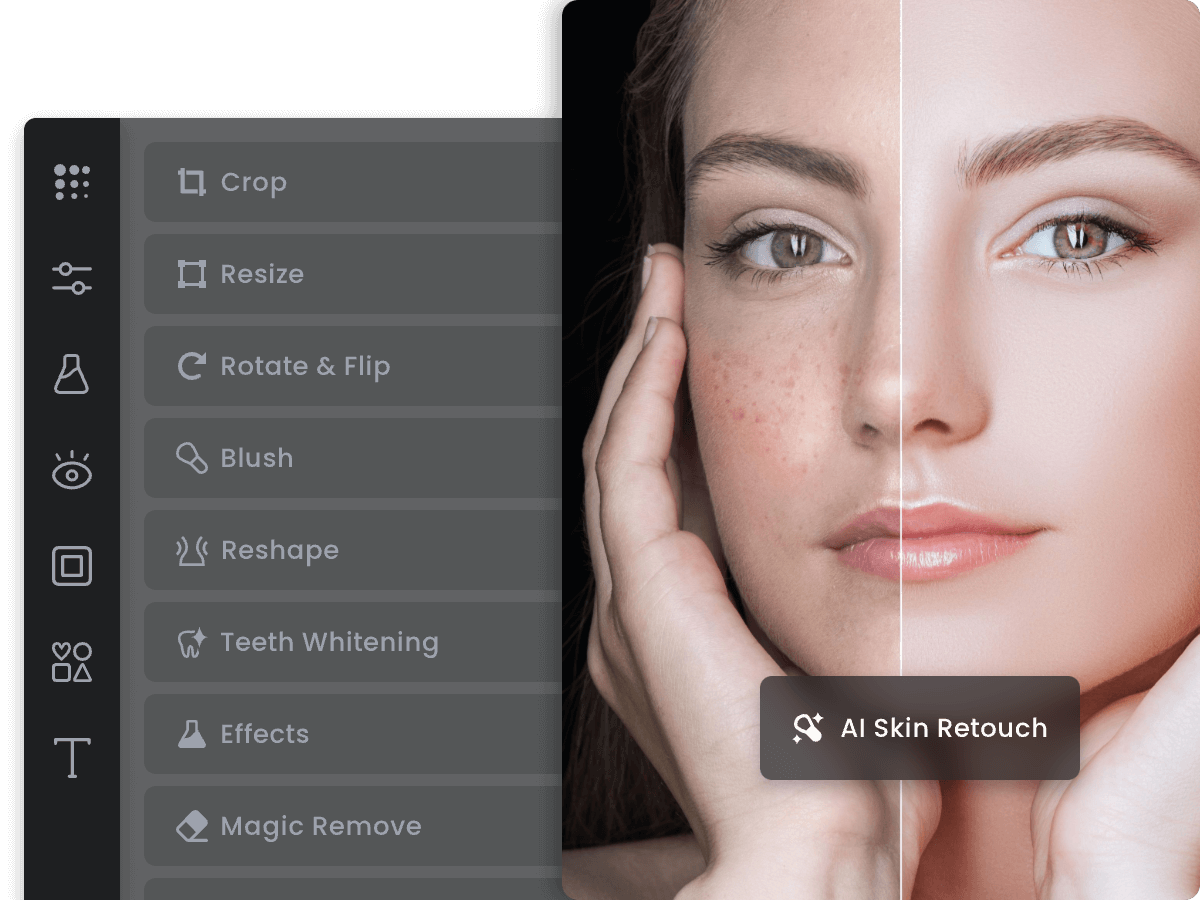
Anyone who opens fotor.com lands on a photo editor first: Fotor asks for an upload or a drag-and-drop, then exposes crop, resize, exposure, colour, retouch, text, sticker and frame controls before offering a JPG, PNG or PDF export.
Fotor pairs a browser photo editor with AI image and video generation, template-based graphic design, and e-commerce visual tools on one account. Creators, sellers, and marketers use Fotor to retouch, remove backgrounds, and batch-edit product photos. A single Fotor subscription unlocks models such as Nano Banana, FLUX, Veo, and Kling.
1 / 2
Verified facts from the vendor site · Last verified Aug 22, 2026. Independent Fotor review covering pricing, features, who it is for, and alternatives.
Anyone who opens fotor.com lands on a photo editor first: Fotor asks for an upload or a drag-and-drop, then exposes crop, resize, exposure, colour, retouch, text, sticker and frame controls before offering a JPG, PNG or PDF export.
Fotor is freemium. It starts at $0/month. Paid plans include Fotor Basic: monthly $0/mo: yearly $0/yr ($0/mo effective). Check fotor.com for current prices.
Fotor has a free tier. Paid plans are available for higher limits and team features.
Fotor is best for teams that want browser photo editor with AI image, video, and design tools on one credit-based account.
Fotor is best for teams that want browser photo editor with AI image, video, and design tools on one credit-based account. Skip it if fotor plan limits come from the published pricing table..
The main Fotor features are Online photo editor with crop, resize, exposure, colour and frame controls, AI Photo Enhancer for one-click lighting, unblur and detail improvement up to 4K/8K, AI Background Remover and Change Background with transparent PNG output, AI Object Remover, Remove Person, watermark and text removal, and Batch photo editor for bulk enhancement and background work.
The closest Fotor alternatives on Citeware are Shakker AI, SeaArt AI, Krea, Hotpot.ai, Draw Things. Full list: https://citeware.io/alternatives/fotor.
Limitations called out on this listing: Fotor plan limits come from the published pricing table.; Fotor packaging is recorded from the vendor pages available at analysis time..
Fotor is available on Web.
 vs
vs Fotor vs Shakker AIStreaming AI image generator with an infinite canvas, WebUI, ComfyUI, and training toolsvs
 Fotor vs SeaArt AIAll-in-one AI creation platform and community for images, video, characters, and model trainingvs
 Fotor vs KreaGenerate, edit, and enhance images, video, and 3D with 100+ AI models in one subscriptionvs
 Fotor vs Hotpot.aiAI image generation, headshots, and photo editing sold by the credit instead of the subscriptionvs
 Fotor vs Draw ThingsPrivate, offline AI image generation for iPhone, iPad, and Macvs
 Fotor vs DeepAIArtificially intelligent tools for naturally creative humans.
Public threads about Fotor
Community observations
No recent Hacker News threads
Nothing matched Fotor on Hacker News right now. Search X, Reddit, or another network above.
Citeware analysis
Anyone who opens fotor.com lands on a photo editor first: Fotor asks for an upload or a drag-and-drop, then exposes crop, resize, exposure, colour, retouch, text, sticker and frame controls before offering a JPG, PNG or PDF export. Around that editor Fotor has stacked four more surfaces that share the same login — AI Image, AI Video, Design and Vibe Marketing — plus an Apps menu pointing at native builds. The Fotor llms.txt file describes the same structure and adds AI Models as a separate catalogue of third-party generators.
The audience Fotor names in its own structured file spans e-commerce sellers, DTC brands, solopreneurs, marketers, content creators and individuals, and the Fotor tool list splits neatly along that line. Hobbyists reach for Fotor features such as photo restoration, colorize, unblur, photo-to-anime, the collage maker and the passport photo maker. Commercial users reach for Fotor tools built around selling, including Ghost Mannequin, Flatlay to Model, Fashion Model AI, AI Listing for Amazon, Etsy and Shopify, UGC Video with AI creator avatars, and Link to Ad, which parses a product URL and renders a video ad.
Day to day, the Fotor workflow the homepage documents is three steps: upload the photo, edit lighting, colour and exposure with effects and overlays, then download and share. Fotor also ships a batch photo editor so the same enhancement or background swap runs across a folder of images, which matters more to catalogue teams than to single-image users. For people who prefer instructions to menus, the Fotor AI Agent takes a natural-language or voice request in any language and executes the editing, generation or design task, and the Fotor API at developer.fotor.com lets coding agents such as Claude, ChatGPT and Cursor call the same capabilities programmatically.
Model breadth is the part of Fotor that has moved fastest. Instead of one house engine, Fotor resells a catalogue that includes Seedream 5.0 Pro, GPT Image 2, Nano Banana, Nano Banana Pro, Nano Banana 2, Ideogram v4, FLUX.1 Kontext [pro], FLUX.2 Pro, Qwen, Wan and Midjourney v7 classic for images, alongside Veo 3, Veo 3.1, Kling 3.0, Kling 2.1 Master, Hailuo 02, PixVerse V6, Vidu Q2 Turbo, Seedance and Grok for video. The Fotor comparison table gates those models by plan across Basic, Pro, Pro+ and Max, so model access is a tier decision rather than a per-model purchase.
Packaging on the Fotor pricing page is where the crawl gets thin. Fotor Basic is published at US$0 and labelled free forever, with limited free credits, one concurrent generation, two AI Agent chats, one AI Agent task, basic editing tools and templates, 30-day creation storage, 512MB of cloud storage, device sync and watermarked JPG, PNG and PDF exports. Fotor Pro, Fotor Pro+ and the Max column in the comparison table render their credit counts and prices as unresolved placeholders on the crawled Fotor page, so the paid sticker figures were not published in a readable form at crawl time. What Fotor does spell out is the feature ladder: Pro adds ten concurrent generations, 1,000 AI Agent chats, 100+ editing tools, 20+ AI portrait retouch tools, 100,000+ templates, 1,000+ premium effects and fonts, unlimited creation storage, 2GB of cloud storage and watermark-free HD transparent PNG exports; Pro+ raises that to 30 concurrent generations, 2,000 chats, five AI Agent tasks, batch background remover and replacement, multiple brand kits, AI slides generation and 100GB of storage; Max shows 50 concurrent generations, 5,000 chats, 500 project folders and 500GB of storage.
Several Fotor limits deserve a hard look. Fotor states that unused credits roll over only while the subscription stays active, and the crawled Fotor page drops the number of months of accumulation. Fotor AI headshots sit outside the subscription entirely as one-time image packages with one free redo, sold under Individual and Team options. There is also a live contradiction on the Fotor site: the homepage FAQ says the free plan lets anyone export edited photos without watermarks, while the Fotor Basic plan card lists watermarked JPG, PNG and PDF exports — both claims are published by Fotor, and neither is reconciled on the pages crawled.
Against peers, Fotor occupies an unusual middle. Where Canva leads with brand and document design and where a pure generator sells one model family, Fotor bundles a Photoshop-lite editor, a multi-vendor generation marketplace, a template library and marketplace listing automation behind one credit pool. That breadth is the argument for Fotor and also its risk, because credits, concurrency and model access all move together with the plan rather than being purchased separately.
Fotor also makes strong self-descriptions in its own llms.txt, calling Fotor "a global leading platform for photo editing and vibe marketing for everyone" and citing "800M+ global users" — both are vendor claims from Fotor rather than independently verified figures, and the same file advises confirming credit amounts and model availability on the Fotor pricing page before citing them.
Suitable for
Teams that want browser photo editor with AI image, video, and design tools on one credit-based account
Evidence: Homepage (Primary) · Pricing (Primary) · Verified Aug 22, 2026.
Citeware analysis
Evidence: Homepage (Primary) · Verified Aug 22, 2026.
Verified facts
Evidence: Homepage (Primary) · Verified Aug 22, 2026.
Verified facts
Fotor Basic
$0/mo
Evidence: Homepage (Primary) · Pricing (Primary) · Verified Aug 22, 2026.
Verified facts
The company behind Fotor is Everimaging.
Citeware analysis
Named models, written separately. These are labeled Citeware analysis, not vendor claims.
anthropic · claude-opus-5 · Aug 22, 2026
Fotor is best understood as a model aggregator with a competent editor bolted on: one account and one credit balance buy access to most of the current image and video generators, plus a genuinely useful set of e-commerce visual tools. The free tier is a demo, and the credit math is the part you have to verify yourself.
As of August 2026 the draw is breadth on one credit pool, not editing depth. Check the live pricing table before budgeting — the published numbers were unrendered at fetch.
The honest pitch is consolidation. Nano Banana Pro, FLUX, GPT Image 2, Midjourney v7 classic, Veo 3.1, Kling, Hailuo, Seedance and more sit behind one login and one credit balance.
For a solo operator that beats maintaining five separate generation subscriptions, and the browser editor means you can crop and clean up the output without exporting anywhere.
Strengths
Watch-outs
openai · gpt-5.6-terra · Aug 22, 2026
Fotor is an unusually broad browser creative suite that is strongest when fast production matters more than painstaking control. Its range is compelling, but the credit model and crowded product surface make it less predictable than a focused editor.
As of August 2026, Fotor stands out as a practical all-in-one visual-production hub, though its AI breadth can make costs and workflow choices harder to parse.
Fact: Fotor combines conventional browser editing, templates, AI image generation, AI video tools and product-marketing utilities in one account. The free tier supports basic editing, while higher tiers add credits, concurrent generations, storage and premium exports.
Judgment: that breadth is genuinely useful for sellers and marketers who would otherwise jump among specialist tools. Background removal, batch work and ready-made layouts make the everyday workflow more persuasive than the novelty features.
Strengths
Watch-outs
Verified facts
Common questions about Fotor.
Anyone who opens fotor.com lands on a photo editor first: Fotor asks for an upload or a drag-and-drop, then exposes crop, resize, exposure, colour, retouch, text, sticker and frame controls before offering a JPG, PNG or PDF export. Source: https://www.fotor.com/
Fotor is freemium. It starts at $0/month. Paid plans include Fotor Basic: monthly $0/mo: yearly $0/yr ($0/mo effective). Check fotor.com for current prices. Source: https://www.fotor.com/pricing
Fotor has a free tier. Paid plans are available for higher limits and team features. Source: https://www.fotor.com/pricing
Fotor is best for teams that want browser photo editor with AI image, video, and design tools on one credit-based account. Source: https://www.fotor.com/
Fotor is best for teams that want browser photo editor with AI image, video, and design tools on one credit-based account. Skip it if fotor plan limits come from the published pricing table.. Source: https://www.fotor.com/
The main Fotor features are Online photo editor with crop, resize, exposure, colour and frame controls, AI Photo Enhancer for one-click lighting, unblur and detail improvement up to 4K/8K, AI Background Remover and Change Background with transparent PNG output, AI Object Remover, Remove Person, watermark and text removal, and Batch photo editor for bulk enhancement and background work. Source: https://www.fotor.com/
The closest Fotor alternatives on Citeware are Shakker AI, SeaArt AI, Krea, Hotpot.ai, Draw Things. Full list: https://citeware.io/alternatives/fotor. Source: https://www.fotor.com/
Limitations called out on this listing: Fotor plan limits come from the published pricing table.; Fotor packaging is recorded from the vendor pages available at analysis time.. Source: https://www.fotor.com/
Fotor is available on Web. Source: https://www.fotor.com/
Common Fotor use cases include Online photo editor with crop, resize, exposure, colour and frame controls, AI Photo Enhancer for one-click lighting, unblur and detail improvement up to 4K/8K, AI Background Remover and Change Background with transparent PNG output, AI Object Remover, Remove Person, watermark and text removal, Batch photo editor for bulk enhancement and background work, AI Image Generator driven by Nano Banana, Nano Banana Pro, FLUX, GPT Image 2, Seedream, Ideogram and Midjourney v7 classic, AI Video Generator with Veo 3, Veo 3.1, Kling, Hailuo, PixVerse, Vidu, Seedance, Wan and Grok, Video enhancer, video background remover and video object remover. Source: https://www.fotor.com/
Fotor is made by Everimaging. Official site: https://www.fotor.com/.
Confirm pricing, limits, and support on the official site before you buy. Source: https://www.fotor.com/
Evidence: Homepage (Primary) · Verified Aug 22, 2026.
Looking for more options? Browse all Fotor alternatives.
Public threads about Fotor
Community observations
No recent Hacker News threads
Nothing matched Fotor on Hacker News right now. Search X, Reddit, or another network above.